


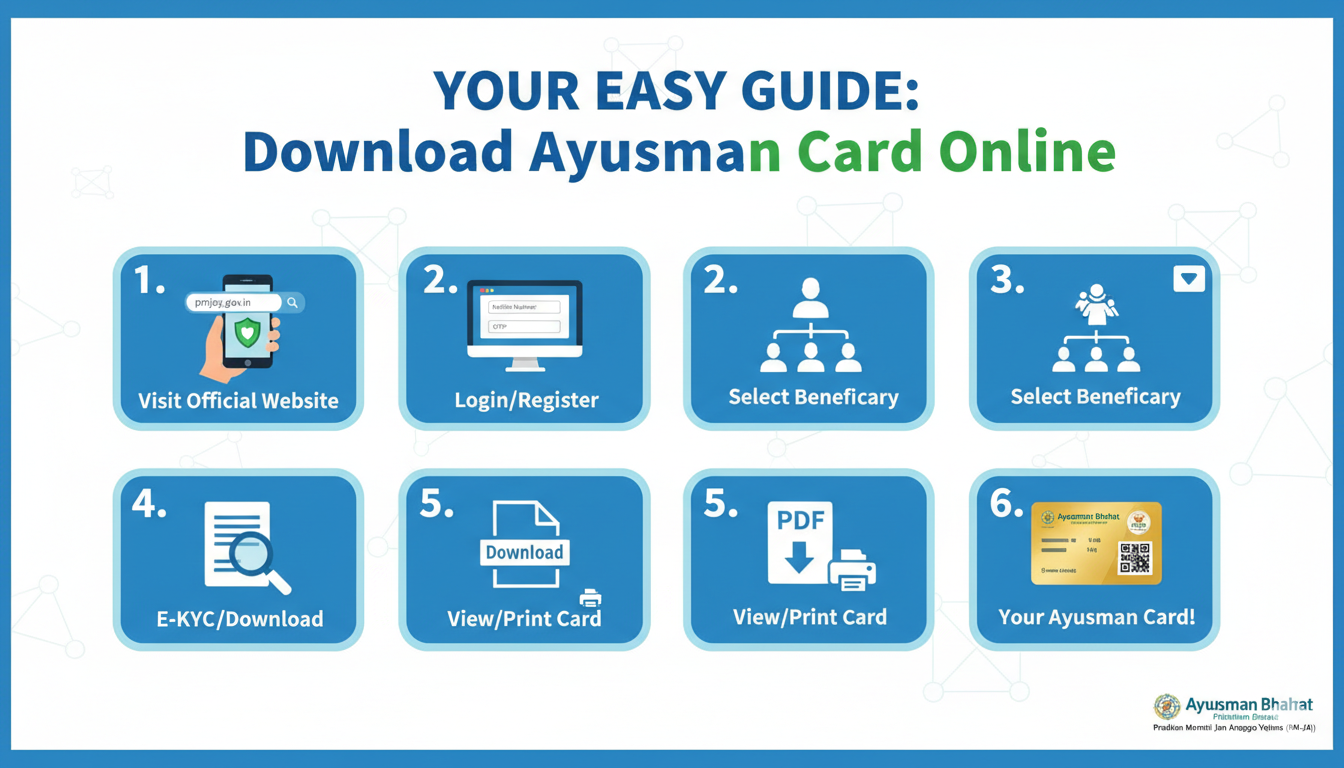
Have you ever worried about high hospital bills? Many families in India feel this stress every day. Luckily, the government has a special gift called the Ayushman Bharat scheme. This plan gives families up to ₹5 lakh for medical help every year. But to get this help, you need a physical or digital card. If you are wondering how to download ayushman card online, you are in the right place! This guide is written just for you. We will use very simple steps so that even a young student can understand.
Getting your health card is now easier than ever. You don’t have to stand in long lines at a government office anymore. With just a smartphone and an internet connection, you can finish the process from your sofa. In the next few sections, we will walk through the different ways to get your card ready. Whether you want to use your phone number or your Aadhaar card, we have covered all the tricks for you.
Quick Facts: Ayushman Bharat Yojana 2026
| Feature | Details |
| Full Name | Ayushman Bharat Pradhan Mantri Jan Arogya Yojana (PM-JAY) |
| Benefit Amount | ₹5 Lakh per family every year |
| Card Name | Ayushman Card (Golden Card) |
| Official Website | beneficiary.nha.gov.in |
| Mobile App | Ayushman App (available on Play Store) |
| Helpline Number | 14555 |
| Target Audience | Economically weaker sections & Seniors above 70 |
Why You Need to Know How to Download Ayushman Card Online
The Ayushman card is like a magic key for health. If someone in your family gets sick, this card helps you get treatment for free in big hospitals. Knowing how to download ayushman card online saves you time and money. You can keep a digital copy on your phone. This way, if there is an emergency, you don’t have to hunt for paper files. You just show your phone at the hospital desk, and the doctors can start helping right away.
Visit the Official NHA Beneficiary Portal
The first move is to go to the right website. You should visit the National Health Authority (NHA) portal. Make sure you are on the official site to keep your data safe. Once the page loads, you will see a login section. This is the starting point for anyone learning how to download ayushman card online. Look for the “Beneficiary” option. This is for regular people like us who want to access their own health benefits.
Use Your Registered Mobile Number
To log in, you need to enter your mobile number. It is best to use the one linked to your Aadhaar card. After you type your number, click on the “Verify” button. You will get a small code called an OTP on your phone. Type that code into the website. This confirms that it is really you trying to look at your card. It’s a great security step that the government uses to protect your private health information.
Search for Your Family Details
Once you are logged in, you need to find your name in the big list. You will have to select your State and the Scheme (usually PMJAY). Then, you can search using your Family ID, Aadhaar Number, or even your name. Using the Aadhaar number is usually the fastest way. When you click search, the names of all your family members will pop up on the screen. This is a key part of how to download ayushman card online successfully.
Check Your e-KYC Status
Before you can get the card, the system needs to know you are “verified.” You will see a status next to each family member’s name. If it says “Approved,” you are ready to go! If it says “e-KYC Pending,” you might need to do a quick face scan or use another OTP to finish your verification. Don’t worry, the website gives clear instructions on what to do next. Most people find that their cards are already approved and ready for the final step.
How to Download Ayushman Card Online Using Aadhaar
Now for the best part! Next to your name, you will see a small downward arrow or a “Download” button. Click it. The system will ask for one last Aadhaar verification. You will get an OTP on your Aadhaar-linked phone number. After you enter this, the card will appear on your screen as a PDF file. This is exactly how to download ayushman card online without any mistakes. You can now save it to your phone or Google Drive.
Using the Ayushman Mobile App
If you prefer using an app, the government has a great one called the “Ayushman App.” You can find it on the Google Play Store. The steps are very similar to the website. Open the app, log in as a beneficiary, and follow the prompts. The app is very friendly and works well even on older phones. Many people find the app easier because you can use “Face Auth” (looking at the camera) to verify your identity instead of waiting for a text message.
Can I Download the Card via DigiLocker?
Yes, you can! DigiLocker is a digital wallet for your documents. If your card is already generated, you can search for “Pradhan Mantri Jan Arogya Yojana” in the search bar of DigiLocker. Enter your PMJAY ID or Aadhaar details, and the card will be added to your “Issued Documents” section. This is a fantastic secondary way for how to download ayushman card online and keep it safe forever.
What to Do If Your Name is Not in the List?
Sometimes, you might not find your name. This usually happens if your family was not part of the old 2011 survey or if your data is not updated. Don’t lose hope! You can visit a nearby Common Service Center (CSC). The people there can help you check your eligibility and add your name if you qualify. You can also call the helpline at 14555 to ask for guidance on your specific case.
Benefits of Having the Digital Golden Card
Having a digital card means you are always prepared. You get cashless treatment at any empanelled hospital across India. This includes both government and private hospitals! The card covers surgeries, medicines, and even follow-up care. By learning how to download ayushman card online, you are ensuring that your family has a safety net. You won’t have to borrow money or sell belongings to pay for a surgery in the future.
Keeping Your Health Card Safe
Once you have the card, treat it like your bank card. Do not share your OTP with strangers. Only use official government apps and websites. If you print the card, you might want to laminate it so it doesn’t get ruined by water or dust. It is a good idea to send the PDF file to other family members so everyone has a copy on their phones just in case of an emergency.
Conclusion: Take Action Today!
Learning how to download ayushman card online is a small step that brings big peace of mind. Your health is your wealth, and this government scheme is here to protect it. Don’t wait until someone gets sick to look for your card. Go to the portal today, follow our easy steps, and get your Golden Card ready. It only takes a few minutes, and it is completely free! If you found this guide helpful, why not share it with a neighbor or a friend who might need it?
Frequently Asked Questions (FAQs)
1. Is there any fee for learning how to download ayushman card online? No, the process is completely free. The government does not charge any money for downloading the card from the official website or app.
2. Can I download my card if my mobile number is not linked to Aadhaar? It is much easier if they are linked. If they are not, you can use the “Face Auth” feature on the Ayushman App or visit a CSC center for biometric help.
3. What is the limit of the Ayushman card benefit? Each eligible family gets a cover of up to ₹5 lakh per year. This can be used by one member or shared by the whole family.
4. Can I use the Ayushman card in any private hospital? You can use it in any hospital that is “empanelled” or partnered with the PMJAY scheme. You can check the list of hospitals on the official website.
5. How long does it take for the card to be ready after e-KYC? Usually, it is instant! Once your e-KYC is approved, the download button should work immediately. Sometimes it may take up to 24 hours.
